Cooling fan does not work? Don't forget to check the supporting problems!
σīu | 2025-01-02

In computer use, electronic equipment maintenance, and even some industrial scenes, the cooling fan is the key guard to ensure the stable operation of the equipment. However, sometimes the guard suddenly "quit" and stopped working. Many people think that the fan itself is broken at the first time, but ignore an important factor - the supporting link may also have a "root cause".
Power supply: source failure of power
Stable and sufficient power supply is the cornerstone for the cooling fan to rotate. Many times, the power of the power adapter we use is not up to the standard. Just like a small horse pulling a cart, it can not drive the fan to reach the rated speed, or even make the fan motionless. Imagine you connected a high-power fan to a low-power, weak output power supply. Where does it get the strength to rotate? Moreover, poor contact such as loose and rusty power interface is very common. Intermittent current makes the fan "dizzy" and can only stand still in the end. Even worse, if the internal circuit of the power supply is short circuited or the capacitor explodes, the power sent to the fan is directly cut off, and the fan will completely lose the possibility of starting.
Flat cable: neglected transmission link
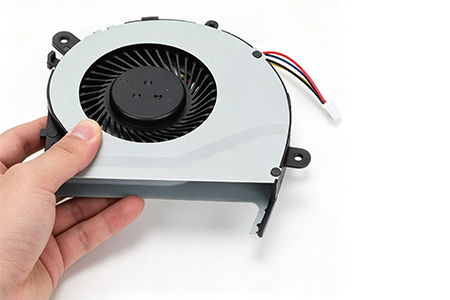
Although the flat cable is inconspicuous, it is the key bridge between the fan and the motherboard and power supply. Frequent shaking and plugging in and out in daily use can easily cause abrasion and fracture of the flat cable. Once the ribbon cable is "injured", the current and control signal cannot reach the fan smoothly. Sometimes, just because the plug of the ribbon cable is loose and touches the equipment a little, the fan can turn for a short time, but it stops again soon. This kind of ambiguous connection makes the troubleshooting more difficult. If you don't check the cable carefully, it's a waste of effort to overhaul the main body of the fan.
Control module: the "commander" of fan operation
The control chip and speed regulation module on the motherboard control the start and stop of the fan and the speed rhythm. When these components are affected by moisture, electrostatic impact, or component aging due to long-term use, their instructions to the fan will be disordered, or even no longer send any "start" signal. For example, this is like an army without a commander. Even if the soldiers (fans) are strong and have enough food (electricity), they can only stand by and do not know when to rush forward, so that the cooling work is at a standstill.
How to solve the problem that the cooling fan does not work caused by the supporting equipment? For the power supply, it is necessary to select the regular power supply products suitable for the power of the equipment, regularly check whether the interface is stable, and gently polish it with sandpaper in case of rust; If the cable is flat, gently insert and remove it for reinforcement. If it is obviously damaged, it must be replaced with a new cable of the same specification; If the control module is damaged, non professionals had better turn to after-sales maintenance personnel to accurately detect and replace the faulty components with the help of professional tools.
Next time when the cooling fan strikes, don't stare at the fan. Spend more time on checking these supporting links. Maybe the problem will be solved and the equipment will quickly return to the state of calm operation.
How to determine the quality of a double ball bearing cooling fan?
New energy tram cooling: why cooling fans are indispensable
Related blog